INTRODUCING
ODYSSEY by epic (Odis for short.)
Navigating your product journey from order to delivery.
MEET ODIS
Every shipment of fiber, optics, or network gear has a story – where it came from, where it’s headed, and everything that has to go right in between.
That’s the journey Odyssey by Epic is built around. Named for the iconic epic voyage, it gives Epic Broadband Solutions’ customers a clear, real-time view of their own materials: orders placed, inventory on hand, shipments in transit, all in one place instead of scattered across email threads and spreadsheets.
We call it Odis for short, because a tool your team relies on every day should feel like part of the crew, not another piece of software to manage. It’s built by Epic, the same broadband hardware experts your team already calls for fiber, bays, and optics, so the people running your products are the same people who understand the importance of accurate material managment.
ODYSSEY:
A LONG VOYAGE USUALLY MARKED
BY MANY CHANGES OF FORTUNE
FEATURES
Five Screens. Everything You Need.
01 DASHBOARD
At-a-glance command center for every customer.
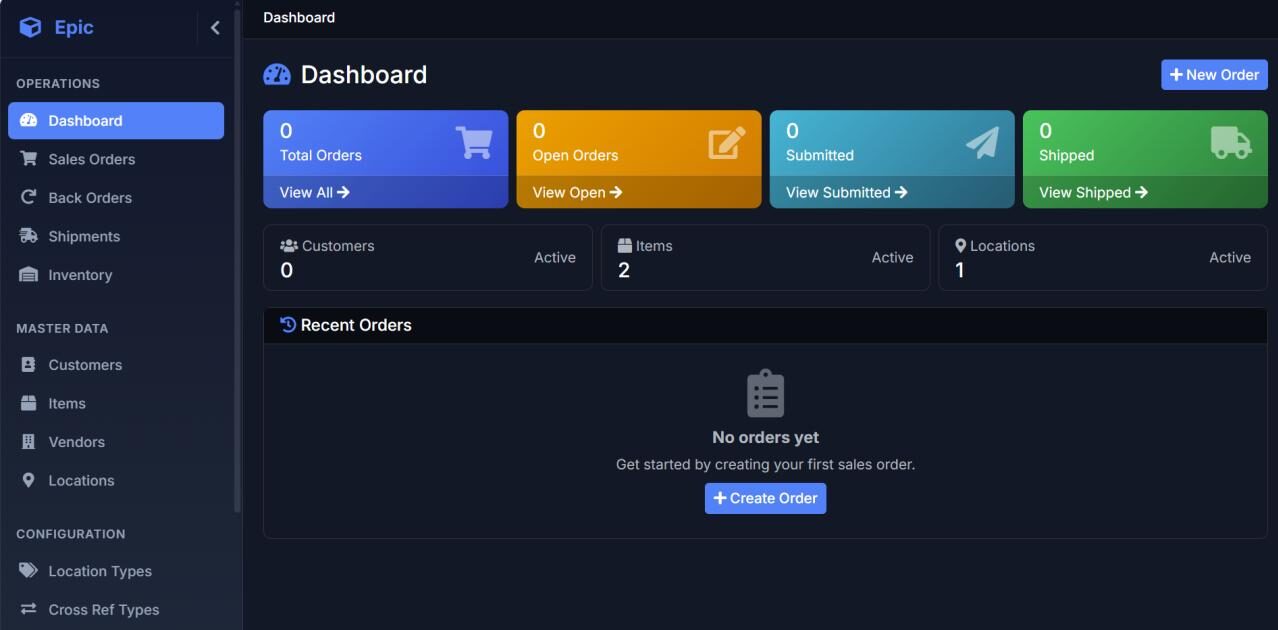
The moment a customer logs in, they see exactly where things stand. Open orders, submitted orders, shipped orders, and total order history are all surfaced on a single screen, alongside counts of active customers, items, and locations. Recent orders are always one click away.
LIVE ORDER STATUS TILES
Total, Open, Submitted, and Shipped counts update in real time.
ONE-CLICK NEW ORDER
Customers can start a new sales order directly from the dashboard.
MASTER DATA VISIBILITY
Active customer, item, and location counts at a glance.
RECENT ACTIVITY FEED
The most recent orders are always within reach for fast follow-up.
02 MASTER DATA
Customers, Items, Vendors, Locations —
fully user-configurable.
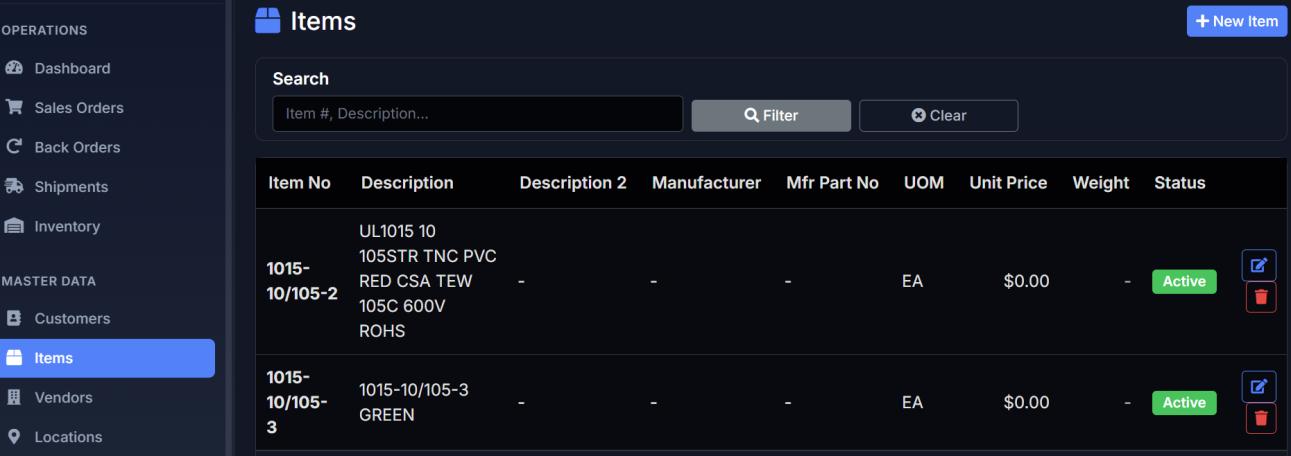
Epic gives you complete control over the data that drives the portal. Your team (or ours) configures Customers, Items, Vendors, Locations, Location Types, and Cross-Reference Types directly in the interface — no developer required. Searchable, filterable lists make finding the right record effortless, even across thousands of SKUs.
ITEM CATALOG
Description, manufacturer, Mfr Part No, UOM, unit price, weight, and status — all editable.
FAST SEARCH & FILTER
Search by item number or description to find records instantly.
CUSTOMER & VENOR RECORDS
Maintain full trading-partner data in one place.
LOCATION FLEXIBILITY Configure warehouses, bins, and location types to match your operation.
03 ORDER ENTRY
Customers place their own orders —
accurately, on their schedule.
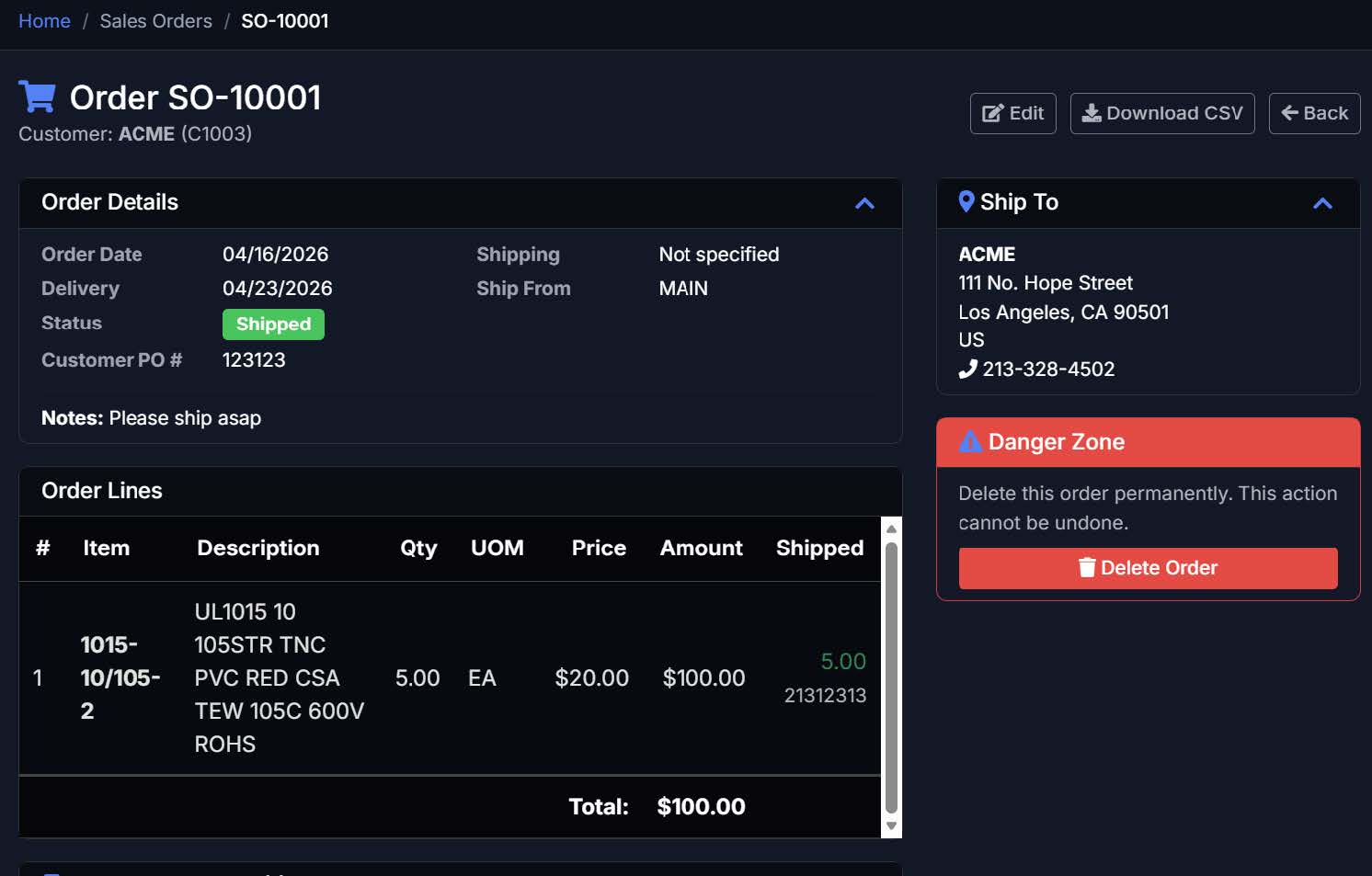
Every order a customer types themselves is an order your team doesn’t have to re-key. Epic’s order entry captures Customer PO numbers, requested delivery dates, ship-from locations, line-item pricing, and notes — and surfaces shipment status back against each order as it progresses. Full order history is printable and downloadable to CSV.
FULL HEADER & LINE DETAIL
Order date, delivery date, Customer PO, ship-to address, notes, and more.
SHIPMENT TRACKING
PER LINE
See exactly what’s shipped on each line, with tracking numbers linked.
EDIT & DOWNLOAD
Customers can edit open orders and export to CSV anytime.
STATUS AT A GLANCE
Clear visual badges for Open, Submitted, and Shipped states.
04 INVENTORY
Real-time stock visibility across every location.
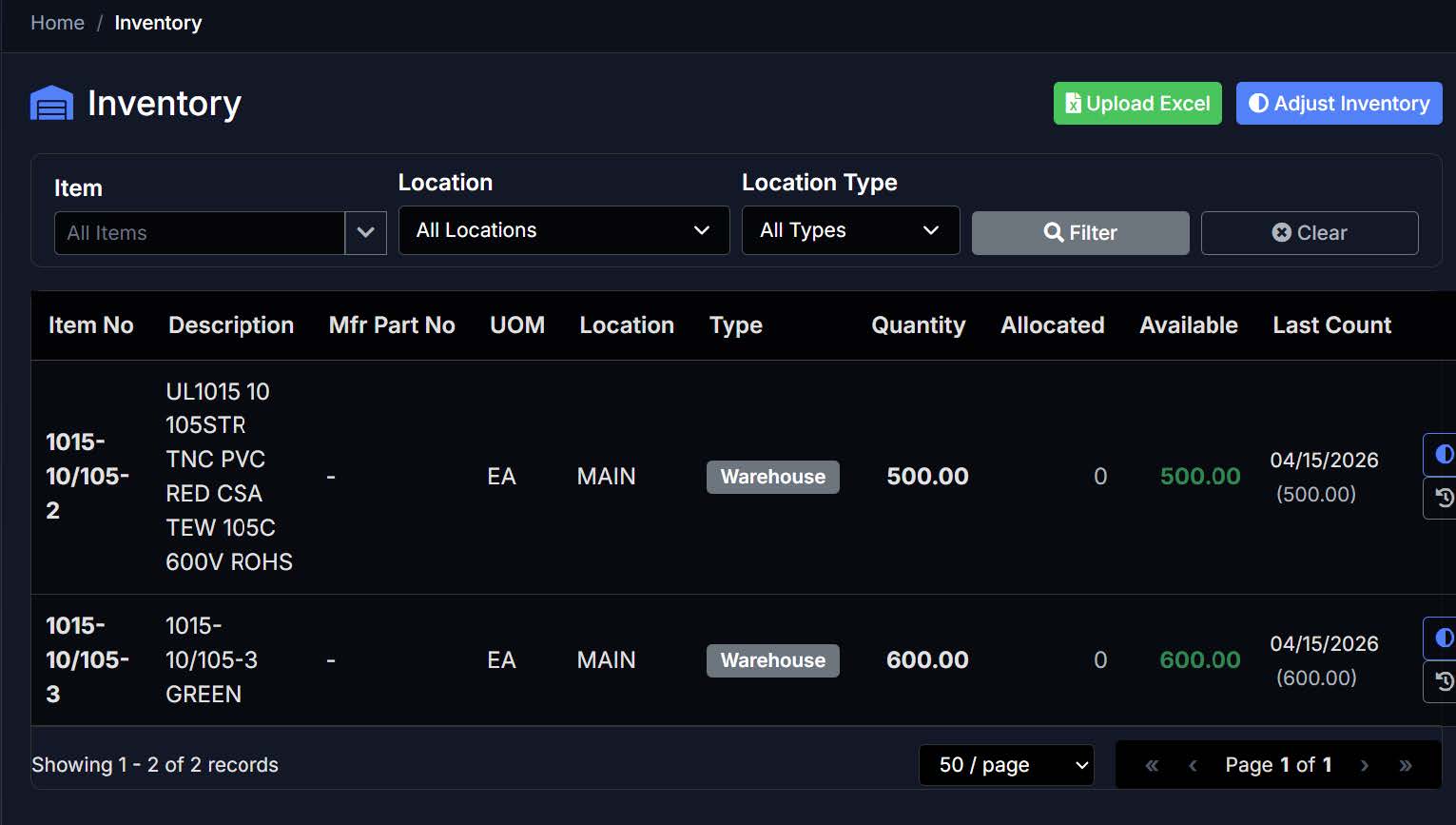
Stop fielding “do you have any?” calls. Epic shows on-hand quantities, allocated quantities, and available-to-promise across every location and location type. Filter by item, location, or warehouse type. Inventory can be adjusted in-app or uploaded via Excel for fast cycle-count reconciliation — and every change is time-stamped with a last-count date.
QUANTITY, ALLOCATED, AVAILABLE
Three views of stock so customers see what they can actually buy.
MULTI-LOCATION READY
Filter by specific locations or roll up across all warehouses.
EXCEL UPLOAD
Bulk-adjust inventory from a spreadsheet — perfect for cycle counts.
AUDIT TRAIL
Every adjustment keeps a timestamped history for traceability.
06 SHIPMENT
Track every shipment back to its source order.
The Shipments screen gives customers a complete view of what’s leaving your dock. Each shipment links back to the originating sales order, shows carrier and tracking number, and records exactly what was shipped — down to quantity per line. Search by shipment number, tracking number, order, customer, or item to find anything in seconds.
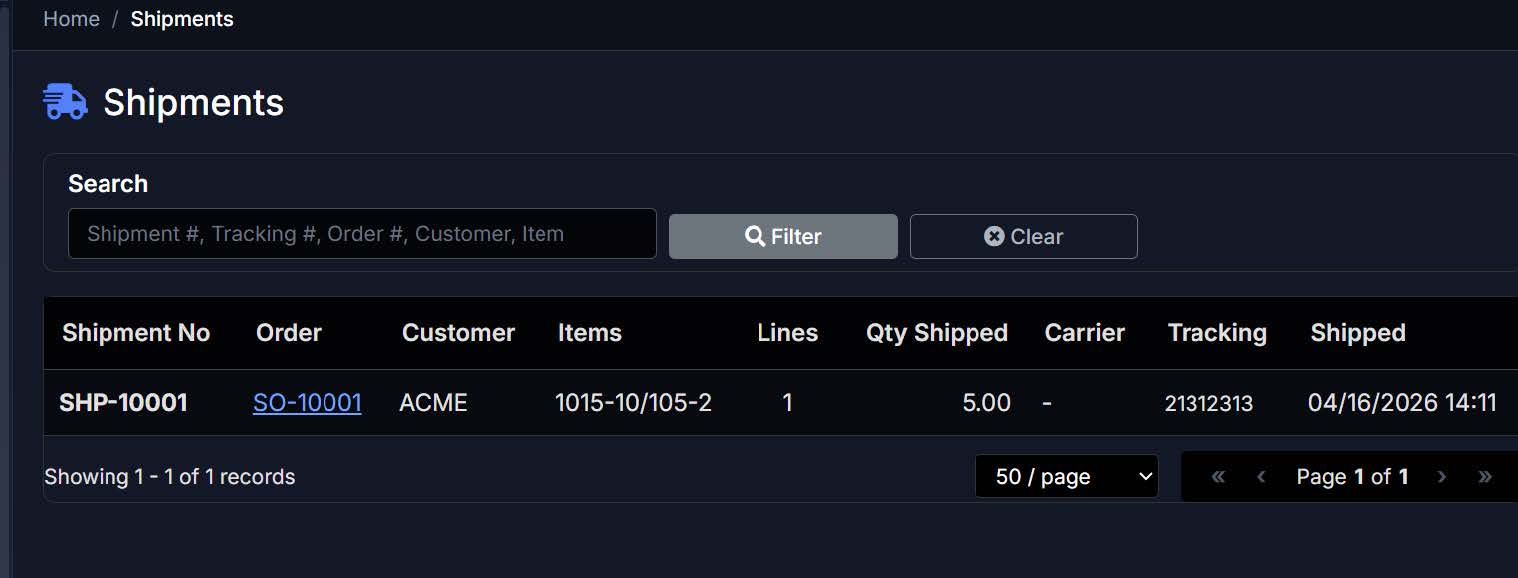
ORDER LINKAGE
Click directly from a shipment to the source sales order.
TRACKING NUMBERS
Carrier tracking numbers surfaced for every shipment.
FLEXIBLE SEARCH
Find shipments by any field — tracking, order, customer, item.
SHIP DATE & QTY DETAIL
Exact date, time, and quantity shipped recorded for each line.
YOUR ORDERS. YOUR INVENTORY.
ONE LOGIN.
Odis gives you real-time visibility and one-click reordering, straight from the manufacturer — no more chasing down a rep for a status update.